
 ·
6 minute read
·
6 minute read
If your business regularly produces high volumes of printed materials like proposals, training manuals, marketing collateral, and direct mail pieces, you already know how quickly outsourcing costs can add up. Every rush job sent to an outside print shop, every delay waiting on proofs, every reorder because specs changed at the last minute: it adds up in ways that don’t always show up in one neat line item.
A production printer can significantly change that math. But it’s not a simple purchase, and it isn’t right for every organization. Understanding what separates a production printer from the office copier down the hall, and knowing which questions to ask before committing, is what makes the difference between a smart investment and an expensive mistake.
What Makes a Production Printer Different
The most common misconception is that a production printer is simply a faster, bigger version of an office multifunction device. In practice, they’re designed for fundamentally different purposes.
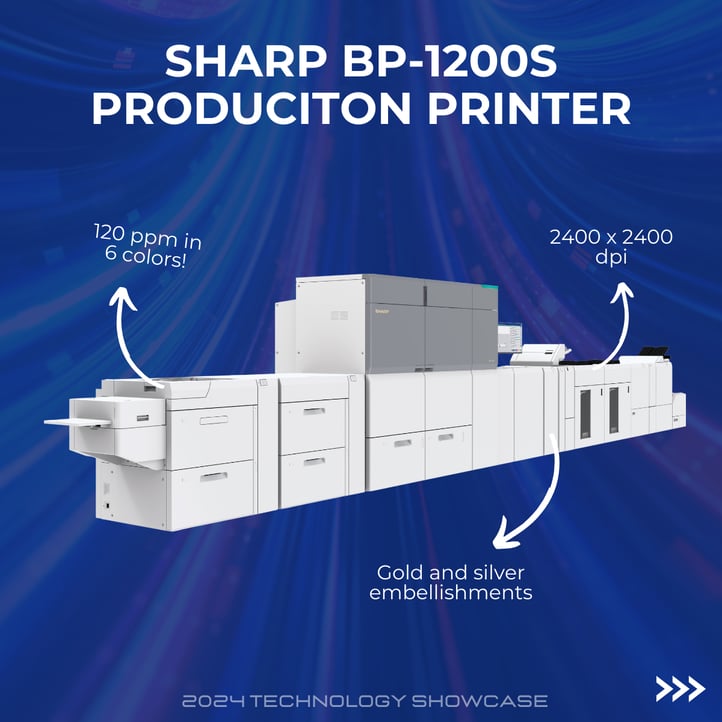
Office printers handle occasional, moderate-volume tasks: everyday documents, internal reports, and the occasional presentation handout. Production printers are built to run continuously at high volumes without degrading in quality or reliability. We’re talking speeds of 60 to 100+ pages per minute, monthly duty cycles that can reach into the millions of pages, and print resolutions often exceeding 2,400 x 1,200 dots per inch for color work. They handle a far wider range of media: heavyweight stocks, cardstock, coated gloss paper, vellum, synthetic substrates, and oversized formats up to 13” x 19” and beyond.
The output they’re capable of, such as booklets with automated binding, full-bleed marketing materials, personalized direct mail, and short-run publications, carries significant per-piece costs and longer lead times when outsourced.
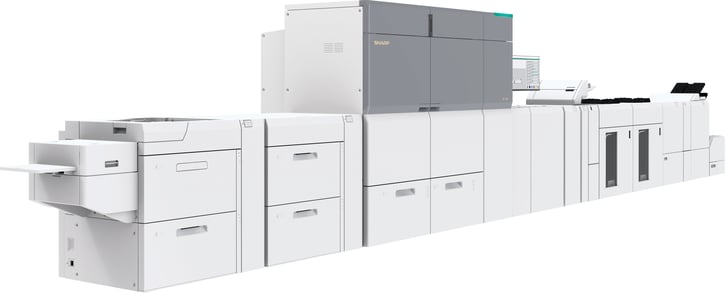 Sharp BP-1200/BP-1200S
The Business Case: When Does It Make Sense?
Before evaluating any specific machine, it’s worth asking whether bringing production printing in-house is the right move.
Volume is the starting point. In-house printing generally becomes cost-effective when an organization prints 10,000 or more impressions per month. At lower volumes, outsourcing typically remains the more cost-effective path.
Turnaround time is often underestimated as a cost factor. When your team needs 500 updated brochures in 48 hours, a production printer in your building is a fundamentally different capability than placing an order with an outside shop. Speed-to-market matters, particularly for businesses in competitive or fast-moving industries.
Maintaining brand consistency is harder when outsourcing. Color accuracy, paper stock, and finish quality can vary from run to run when different vendors are involved. Production printers with built-in color management tools, including Pantone matching and ICC profile support, let organizations maintain tighter control over how their brand appears on every printed piece.
The market data reflects this shift. According to Keypoint Intelligence’s 2025 On Demand Printing & Publishing Forecast, the production print industry is seeing growth in large production color inkjet driven in part by increasing short-run demand and decreasing total costs of ownership for digital printing equipment. For SMBs, that downward pressure on cost of ownership is significant; the financial barrier to entry is meaningfully lower than it was five years ago.
Understanding Total Cost of Ownership
The purchase price is the most visible number, but it’s rarely the most important one. Total cost of ownership (TCO) over a five-year lifespan is where the real comparison lives.
Equipment cost ranges considerably. Entry-level production printers typically start around $20,000 to $40,000, while mid-range digital presses often range from $50,000 to $150,000. High-end production systems with advanced inline finishing, specialty toners, or automation features can exceed $250,000 and may reach well into the six figures. Many organizations choose to lease rather than purchase outright, turning a large capital investment into a more predictable monthly operating expense.
Consumables are structured differently than on office devices. Toner on production systems is typically priced per page, not by cartridge. Negotiating a managed print service agreement that bundles toner, maintenance, and support under a flat cost-per-click rate is standard practice. Modelling that cost-per-click against your projected monthly volumes, for both colour and black-and-white, is one of the most important financial exercises before signing anything.
Space and power are practical constraints that catch buyers off-guard. A base production printer configuration can measure 8 to 9 feet in length, with finishing units that can extend well beyond 20 feet. Clearance of 2.5 feet on all sides for servicing is standard. Power requirements often include dedicated 220-volt circuits, and finishing modules may each need their own outlet. Depending on your facility, that preparation work adds meaningful upfront cost.
Print Quality and Finishing: What to Evaluate
Two primary technologies dominate the production print space, each serving different needs.
Electrophotographic (toner-based) systems deliver exceptional color accuracy and sharpness across a wide range of coated and uncoated stocks. They’re well-suited for marketing materials, corporate documents, and short-run publications where color consistency matters.
High-speed inkjet systems excel at very high-volume, lower-cost-per-page output — transactional printing, direct mail, book production. Inkjet quality has improved significantly, but paper selection matters; not all stocks perform well with water-based inkjet inks.
For color-critical work, look for systems that include built-in spectrophotometers for automatic calibration and support for expanded colour gamuts. A system that reliably hits a specific Pantone color across thousands of impressions is a meaningfully different tool than one that can’t.
Finishing capabilities are where production printers most visibly separate themselves from office devices. Inline finishing, such as folding, stapling, punching, and stacking, as part of a single automated run, changes the economics of producing finished materials in-house. Booklet makers, perfect-binding modules, and large-capacity output stackers are worth evaluating based on your most frequent output types.
Scalability and Software Integration
One of the more common regrets after a production printer purchase is buying too close to current need and becoming capacity-constrained within 18 months. Once the capability is in-house, teams that previously avoided certain projects due to outsourcing costs start bringing them in-house, increasing volume. Building in 30% to 50% capacity above the current projected need is a reasonable buffer. Also, ask about each platform’s modular upgrade path: some systems allow you to add finishing units and feeders over time, while others require a full equipment replacement.
On the software side, a production printer that doesn’t connect well to your existing design and document workflows creates more friction than it solves. Verify that any system you’re considering integrates with your current design software, supports variable data printing if personalized output is part of your plans, and includes a job management interface that lets operators monitor queues and track costs.
The digital front end (DFE), the software controller that processes files and manages print jobs, varies considerably in capability and deserves as much attention as the hardware itself. A strong DFE preflights files, automates imposition for booklet production, manages color profiles, and provides detailed job accounting. A weak one creates workarounds.
Service, Support, and Vendor Partnership
Production printers are mission-critical equipment. When one goes down, the consequences ripple through your schedule in ways that a broken office copier simply doesn’t. The service agreement and vendor relationship are arguably as important as the hardware specification.
Look for guaranteed on-site response times in writing and ask what the average response time is in your specific area, not just what the contract states. Ask about parts availability for the model you’re considering, especially for consumables such as drum units and fuser assemblies. And ask whether hands-on operator training is included with purchase, and what ongoing support looks like as your team changes over time.
Working with a vendor who represents multiple manufacturers is worth prioritizing. It’s more likely to produce a genuinely matched recommendation rather than a push toward a single product line, and gives you more options as your needs evolve.

Ready to Explore Your Options?
At Pulse Technology, we’ve spent decades helping businesses across Illinois, Indiana, and Wisconsin make confident, well-informed decisions about their print environments.
Whether you’re evaluating production printing for the first time or looking to replace an aging system, our team can walk through your volumes, goals, and budget, and help you find a solution that fits. Contact Pulse Technology to start a conversation with one of our print specialists.
Frequently Asked Questions
What’s the difference between a production printer and a high-volume office copier?
Office multifunction devices, even heavy-duty ones, are designed for shared office use, not sustained commercial-grade output. Production printers are engineered for continuous high-speed operation, significantly wider media handling, and finishing capabilities that office devices can’t match. They’re also rated for far higher monthly impression volumes before wear becomes a factor.
Can a small or mid-sized business realistically afford a production printer?
More often than the upfront numbers might suggest. Many SMBs lease production equipment rather than purchasing outright, thereby spreading the cost over the device's life. When you factor in what you’re currently spending on outsourced commercial printing, and what you’d gain in turnaround speed and print control, the numbers frequently shift in favor of bringing it in-house.
What should I watch for in a service agreement?
The most important terms to review are guaranteed on-site response times, what’s included in the cost-per-click rate (toner, parts, labor), and escalation provisions if downtime exceeds certain thresholds. Also, ask whether firmware and software updates for the digital front end are covered, as these can meaningfully affect functionality over the life of the device.
Do I need special IT or facility preparation to support a production printer?
Most modern production printers connect to standard business networks and work with common print management software. That said, large-file workflows (high-resolution PDFs and graphics) can strain network bandwidth, and most facilities need electrical work to support the dedicated circuits these machines require. A site assessment before purchase helps surface those needs early.